XPARO documentation
XPARO gives your ROS 2 robot a cloud dashboard and a behaviour engine. You install one ROS 2 package on the robot. It connects to xparo.in, and from your browser you can watch it live, run behaviour trees on it, open a terminal, move files, drive it, record ROS bags and keep everything it reports.
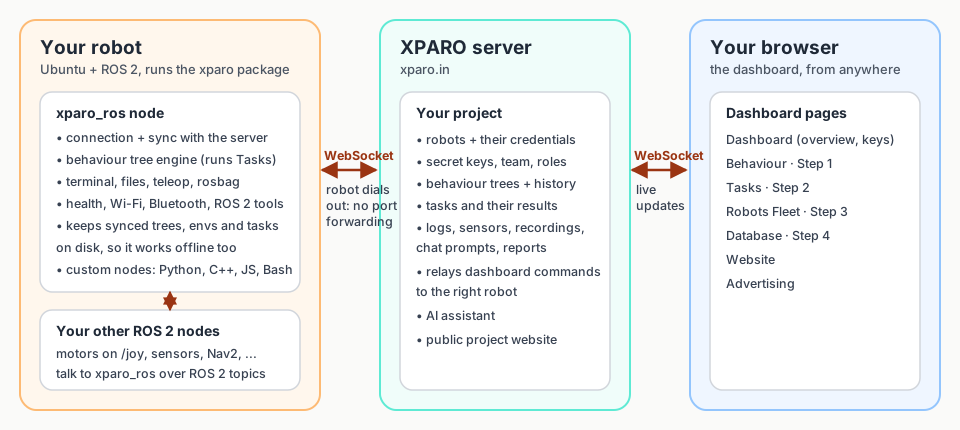
The robot always dials out to the server, so it works behind home or office routers. No port forwarding or public IP is needed.
Where do you want to start?
The ideas in plain words: projects, robots, keys, behaviour trees, tasks and stages. Ten minutes, no code.
Step by step: create a project, generate a key, install the package, see your robot online and run your first task.
What every page in the dashboard is for and how they work together, with screenshots.
Launch parameters, ROS 2 topics, the behaviour tree engine, custom nodes and ROS bag recording.
The WebSocket protocol, every message the robot understands, and the HTTP API.
Robot offline, wrong key, task refused, node not found: causes and fixes.
What you need
An XPARO account. Sign up free at xparo.in/signup. These docs never need a login.
A robot or a computer running Ubuntu with ROS 2. The package is tested on ROS 2 Jazzy (Ubuntu 24.04). A laptop is enough to try everything.
An internet connection on the robot, with outgoing HTTPS and WebSocket access to
xparo.in.
