Connection protocol
How a robot talks to the XPARO server. You only need this to write your own
client (for a robot without ROS 2, or in another language); xparo_ros
does all of it for you.
Addresses
Channel |
Address |
|---|---|
WebSocket |
|
HTTPS |
|
<key> is a project secret key for a robot’s first connection, and the
robot’s own credential afterwards. There is no separate login: the key in
the address is the authentication. A wrong key is refused during the
WebSocket handshake with 403.
Messages
Every message, in both directions, is one JSON object whose keys are dispatch keys (the message names listed in Message catalogue), each with its own payload:
{"ROBOT_HEARTBEAT": {"device_id": "my-robot-0001"}}
Usually there is one key, but one object can carry several. The project sync
the server sends on connect is a single object with many keys (title,
aiml, custom_aiml, custom_tasks, custom_node_files, …), and
the reply to ADD_robots_info combines ROBOT_CREDENTIAL,
REST_API_TOKEN, sync_local_database and others. Handle every key you
know and ignore the rest.
Some server messages are wrapped in a message key, for example answers
from the AI assistant:
{"message": {"bot_response": "...", "responded_by": "llm"}}
A robot’s first connection
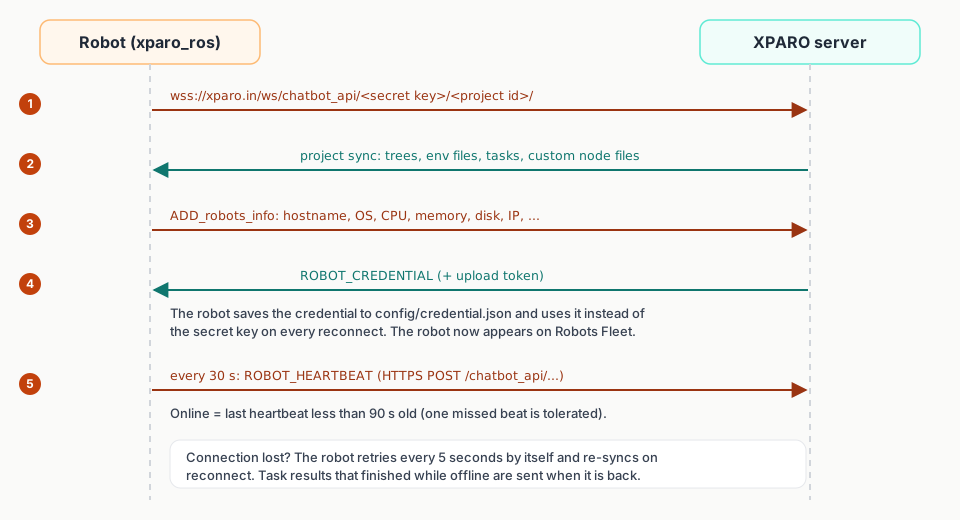
Open the WebSocket with the project’s secret key.
The server sends the project sync.
Send
ADD_robots_infowith the robot’s details (below).The first time a device ID is seen, the reply contains
ROBOT_CREDENTIAL. Save it and use it instead of the secret key from now on; it is sent only once.Every 30 seconds, send
ROBOT_HEARTBEAT(xparo_rossends it with an HTTPS POST to the HTTPS address). The dashboard shows the robot online while the last heartbeat is less than 90 seconds old.
ADD_robots_info must contain all of these fields, as text: device_id,
hostname, os_name, os_version, os_release, mac_address,
ip_address, cpu_model, cpu_count, cpu_physical_count,
total_memory, available_memory, total_disk, used_disk,
free_disk. If any is missing, the robot is not registered properly and
never receives its credential. Optional: ros_distro,
xparo_git_commit, locations ({"latitude": ..., "longitude":
...}), data (free-form details), width and height (screen size).
device_id identifies the robot: keep it the same across restarts, or the
robot appears as a new one.
Dashboard commands (Run now, terminal, teleop, files…) are delivered only to robots that registered over the WebSocket and are connected.
A complete minimal client
This Python client registers, keeps its credential, sends heartbeats and answers Teleop. It was run against an XPARO server: it appeared online on Robots Fleet, and a Teleop command from the dashboard reached it and was acknowledged.
"""A minimal XPARO robot client without ROS 2: joins a project, keeps a
heartbeat, and answers Teleop commands from the dashboard."""
import json
import os
import threading
import time

import requests
import websocket

SERVER = "xparo.in"
PROJECT_ID = "<your-project-id>"
SECRET_KEY = "<your-secret-key>"
DEVICE_ID = "my-robot-0001"            # any ID that stays the same for this robot
CREDENTIAL_FILE = "xparo_credential.txt"


def secret():
    # After the first connection, use the robot's own credential.
    if os.path.exists(CREDENTIAL_FILE):
        return open(CREDENTIAL_FILE).read().strip()
    return SECRET_KEY


def send(ws, key, payload):
    ws.send(json.dumps({key: payload}))


ROBOT_INFO = {
    # All of these are required (as text); use real values where you have them.
    "device_id": DEVICE_ID, "hostname": "my-robot",
    "os_name": "Linux", "os_version": "Ubuntu 24.04", "os_release": "6.8",
    "mac_address": "02:00:00:00:00:01", "ip_address": "192.168.1.50",
    "cpu_model": "arm64", "cpu_count": "4", "cpu_physical_count": "4",
    "total_memory": "8 GB", "available_memory": "6 GB",
    "total_disk": "64 GB", "used_disk": "12 GB", "free_disk": "52 GB",
}


def on_open(ws):
    print("connected")
    send(ws, "ADD_robots_info", ROBOT_INFO)


def on_message(ws, raw):
    message = json.loads(raw)
    for key, value in message.items():
        if key == "ROBOT_CREDENTIAL":
            open(CREDENTIAL_FILE, "w").write(value)
            print("got my own credential")
        elif key == "TELEOP":
            print("drive:", value["axes"], value["buttons"])
            send(ws, "TELEOP_ACK", {"success": True})
        elif key == "custom_tasks":
            print("tasks in the project:", len(value))


def heartbeat():
    while True:
        url = f"https://{SERVER}/chatbot_api/{secret()}/{PROJECT_ID}/"
        requests.post(url, json={"ROBOT_HEARTBEAT": {"device_id": DEVICE_ID}}, timeout=10)
        time.sleep(30)


threading.Thread(target=heartbeat, daemon=True).start()
websocket.WebSocketApp(
    f"wss://{SERVER}/ws/chatbot_api/{secret()}/{PROJECT_ID}/",
    on_open=on_open, on_message=on_message,
).run_forever(reconnect=5)
pip install websocket-client requests
python3 my_robot.py
Output of the test run (the Teleop came from the dashboard):
connected
tasks in the project: 1
got my own credential
drive: [0.5, 0, 0, 0] [1, 0, 0]
What the dashboard received back:
{"message": {"TELEOP_ACK": {"success": true}}}
Reconnecting
xparo_ros reconnects 5 seconds after a drop and re-syncs. If its saved
credential is refused (the robot was deleted from the project, for example),
it deletes the credential file and connects once more with the secret key it
was started with, which registers it again. Messages that must not be lost
(task results and task history) are kept in memory while offline and sent
after reconnecting.
Connection types
xparo_ros can also poll over HTTPS instead of keeping a WebSocket open
(xparo_connection_type): rest polls only; hybrid uses the
WebSocket and falls back to polling every 2 seconds during an outage of more
than about 25 seconds. In polling mode the robot syncs and reports, but
dashboard commands cannot reach it. See Configuration.
